Stop Renting Your Modem: How Much It's Costing You in 2026
ARRIS SB8200 at $140.99 pays for itself in under 12 months vs. ISP rental fees. Should you buy your own modem? For most cable customers, yes.
Your ISP is charging you $10 to $15 every month to rent a modem you could own outright for $100 to $150. That is $120 to $180 per year, every year, for hardware sitting in your closet. The ARRIS SB8200 costs $140.99 and pays for itself in 8 to 11 months. After that, every month is money back in your pocket. For most cable internet customers, buying your own modem is not a close call.
The only real exception is fiber. If you have Verizon Fios, Google Fiber, or AT&T Fiber, stop reading here: those services use an Optical Network Terminal (ONT) that the ISP owns and maintains. Buying a modem does not apply to fiber connections. For everyone else on Xfinity, Cox, or Spectrum cable service, keep going.
One caveat before buying: if your speeds are slow and you are not certain the modem is the culprit, run the three-test diagnostic first. A wired speed test at the modem takes two minutes and tells you whether the problem is the hardware or the ISP line itself.
The Math That Makes This Obvious
A $14 monthly rental fee sounds trivial. Over five years it is $840. Over the lifespan of a DOCSIS 3.1 modem, which easily runs six to eight years with no maintenance, you are paying $1,000 or more to rent hardware that retails for $140.
The breakeven on the ARRIS SB8200 at $140.99 lands somewhere between month 8 and month 11 depending on what your ISP charges. From month 12 onward, you are saving $10 to $15 every single month. That compounds fast.
The ISP rental argument for keeping their modem: if the hardware fails, they replace it for free. That is true. A new DOCSIS 3.1 modem costs $100 to $150 out of pocket. Factor that in once over a five-year window and the math still favors buying by a wide margin. The risk is real but not significant enough to change the recommendation for most households.
There is one other rental argument worth acknowledging: bundled voice service. If you have a cable phone line tied to your internet plan, your ISP’s gateway is likely handling the VoIP. Replacing it gets complicated. If you have cable TV and internet bundled with phone, check with your ISP before buying. For internet-only customers, there is no complication.
ISP Compatibility: What to Check Before You Buy
Xfinity, Cox, and Spectrum all support customer-owned DOCSIS modems. None of them require you to use their rental equipment for standard cable internet service. Each ISP maintains a compatibility list on their website, and checking it before buying takes two minutes.
For Xfinity, the compatibility list is at xfinity.com/support/internet. The ARRIS SB8200 and Motorola MB8611 are both on it. If you have Xfinity’s 1.2 Gbps or higher plan, the MB8611’s 2.5 Gbps Ethernet port becomes relevant.
For Cox, the same two modems appear on their approved device list. Cox’s Gigablast plan tops out at 1 Gbps downstream, so the SB8200’s dual 1 Gbps ports are sufficient for most Cox customers today.
For Spectrum, customer-owned modems are supported on all internet plans. Spectrum does not charge a modem rental fee in some markets but charges it in others. Check your bill line by line.
DOCSIS 3.1 modems support downstream speeds up to 10 Gbps at the spec level. Your actual speed is capped by your ISP plan, but buying DOCSIS 3.1 now means the hardware is not the bottleneck if you upgrade your plan later. DOCSIS 3.0 modems max out around 1 Gbps and are already a ceiling for anyone on faster plans.
The Three Modems Worth Buying
For most households replacing an ISP rental, one of these three covers every realistic scenario.
The SB8200 at $140.99 is the default recommendation. DOCSIS 3.1, two 1 Gbps Ethernet ports, approved for Xfinity, Cox, and Spectrum. It handles internet plans up to 2 Gbps and the compact design keeps the closet tidy. Setup is connect the coax cable, power it on, and call your ISP to activate by serial number. Takes about ten minutes.
The dual Ethernet ports matter if you want to run two routers or connect directly to a device while a router handles WiFi. For most people, port one goes to the router and port two stays empty. That is fine. The hardware is still the right buy.
- DOCSIS 3.1 — supports Gigabit-plus internet plans
- 2.5 Gbps Ethernet port for multi-gig routers
- Works with Comcast Xfinity, Cox, and Spectrum
- Active Queue Management (AQM) for reduced latency
- 2-year warranty
DOCSIS 3.1 modem with 2.5 Gbps port for multi-gig internet — approved for Comcast Xfinity, Cox, and Spectrum. The pick if you have or plan to upgrade to a multi-gig internet plan.
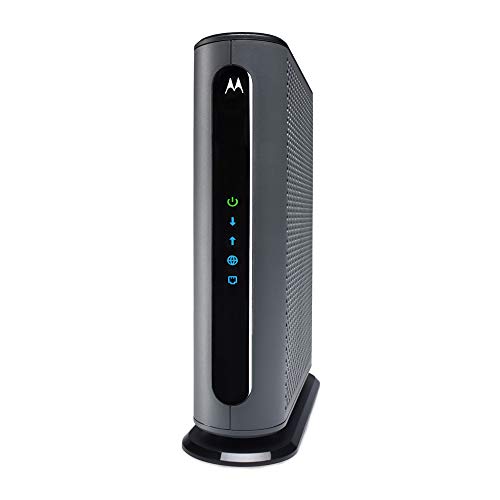
The MB8611 at $244.99 is the right call if you have or plan to upgrade to a multi-gig internet plan. The 2.5 Gbps Ethernet port is the key spec. Standard 1 Gbps ports cap your throughput from modem to router at 1 Gbps regardless of what your ISP delivers. If Xfinity’s 1.2 Gbps plan or Cox’s multi-gig tier is in your future, a modem with a 2.5 Gbps port removes that bottleneck entirely.
Motorola backs it with a 2-year warranty and US-based support. At $244.99 the payback period stretches to 14 to 20 months at typical rental rates, but for a multi-gig household the performance case is as strong as the financial one.
- Mid/high-split DOCSIS 3.1 — up to 2 Gbps download, 1 Gbps upload
- Two Gigabit ports with link aggregation support
- Works with Xfinity, Spectrum, Cox, and other major ISPs
- Not compatible with Xfinity Voice plans
- For use in the US only
NETGEAR Nighthawk DOCSIS 3.1 mid/high-split cable modem — approved for today's faster speeds, works with all major cable providers including Xfinity, Spectrum, and Cox for plans up to 2 Gbps.

[The NETGEAR Nighthawk CM2500 at $249.99 is the premium option](/reviews/netgear-cm2500-vs-motorola-mb8611-modem-2026) for households that want to push upload speeds alongside download. The mid/high-split DOCSIS 3.1 spec delivers up to 2 Gbps down and 1 Gbps up, which matters if you upload large files, run home security cameras you access remotely, or have multiple people on video calls simultaneously. The two Gigabit ports support link aggregation to a compatible router for combined 2 Gbps throughput. Pair it with a WiFi 6E or WiFi 7 router and this hardware will not be your bottleneck for years.
The Bottom Line
For cable internet customers on Xfinity, Cox, or Spectrum, buying your own modem is the right financial decision for almost everyone. The ARRIS SB8200 at $140.99 is the default pick: DOCSIS 3.1, approved by all three major cable ISPs, pays for itself before the end of year one.
If you have a multi-gig plan or plan to upgrade, buy the Motorola MB8611 at $244.99 for the 2.5 Gbps port. If upload speed is a priority alongside download, the NETGEAR CM2500 at $249.99 covers that scenario.
Skip the modem purchase entirely if you are on fiber. And check your ISP’s compatibility list before ordering anything. Two minutes of verification prevents a return shipment.
The rental fee disappears the month after your modem arrives. Every month after payback is pure savings.
Once you have your modem sorted, use the WiFi Recommendation Calculator to find the right router or mesh system for your home size and device count.
// free tool
Not Sure Which Router Fits Your Home?
Answer four quick questions about your square footage, device count, and usage. The WiFi Recommendation Calculator tells you exactly which system to buy.
Use the WiFi CalculatorAs an Amazon Associate I earn from qualifying purchases. • Full affiliate disclosure