Motorola MB8611 Review (2026): DOCSIS 3.1 Modem with 2.5G Port — Worth Buying?
MB8611's 2.5 Gbps port and DOCSIS 3.1 support pay for themselves in under 2 years vs. Xfinity or Cox rental fees. Real specs, compatibility, and verdict.
As an Amazon Associate I earn from qualifying purchases.
// verdict
At $244.99 with a 2.5 Gbps port and DOCSIS 3.1 support, the MB8611 pays for itself in roughly 20 months and is the right buy for anyone on Xfinity, Cox, or Spectrum with a gigabit or multi-gig plan.
Most people renting a modem from their ISP are paying somewhere between $10 and $15 per month and not thinking twice about it. That adds up to $120 to $180 every single year, for hardware you never own and can never upgrade. The Motorola MB8611 costs $244.99 upfront, supports DOCSIS 3.1, includes a 2.5 Gbps Ethernet port, and is approved for use on Comcast Xfinity, Cox, and Spectrum. Whether that price tag makes sense depends on how long you plan to keep your internet service and what plan you’re actually running. Let’s break it all down.
- DOCSIS 3.1 — supports Gigabit-plus internet plans
- 2.5 Gbps Ethernet port for multi-gig routers
- Works with Comcast Xfinity, Cox, and Spectrum
- Active Queue Management (AQM) for reduced latency
- 2-year warranty
DOCSIS 3.1 modem with 2.5 Gbps port for multi-gig internet — approved for Comcast Xfinity, Cox, and Spectrum. The pick if you have or plan to upgrade to a multi-gig internet plan.
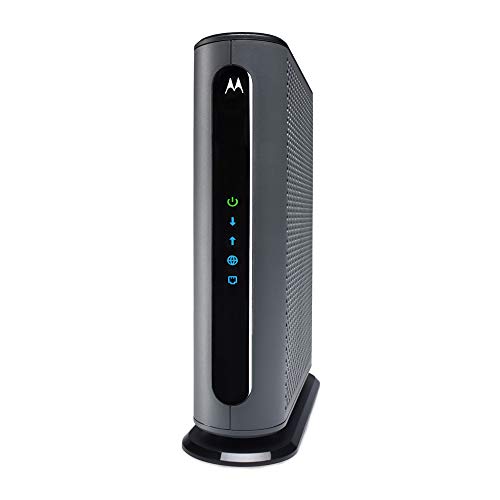
What the MB8611 Actually Is
The MB8611 is a standalone cable modem, not a gateway or router combo. It handles the connection between your coax cable line and your home network, and it does that job at the highest tier currently available for residential cable internet: DOCSIS 3.1.
DOCSIS 3.1 is the current standard for cable internet and supports theoretical downstream speeds well above 1 Gbps. The MB8611 specifically is rated for plans up to 2.5 Gbps, which puts it ahead of most modems on the market that cap out at a single gigabit. The 2.5 Gbps Ethernet port on the back is the physical connection that makes those multi-gig speeds actually usable, but only if your router also has a 2.5 Gbps WAN port. Connecting it to a standard gigabit router will bottleneck you at 1 Gbps, which is still plenty for most households today.
The modem also includes Active Queue Management, which helps reduce bufferbloat. That translates to lower latency during high-traffic periods, which matters for video calls, gaming, and anything else where lag is noticeable.
Approved ISPs include Comcast Xfinity, Cox, and Spectrum. It is not compatible with AT&T, Verizon Fios, CenturyLink, or any fiber-based or DSL service. Those networks use entirely different technologies.
The Numbers: Buying vs. Renting
This is the part most reviews skip past. Here is the actual math.
Typical ISP modem rental fees:
- Comcast Xfinity: $15/month
- Cox: $13/month
- Spectrum: $10/month (though some plans include equipment)
At $15/month (Xfinity):
- Year 1: $180 in rental fees
- Break-even point on the MB8611 at $244.99: approximately 16 to 17 months
- Savings over 3 years: roughly $295
- Savings over 5 years: roughly $655
At $13/month (Cox):
- Break-even point: approximately 19 months
- Savings over 3 years: approximately $223
- Savings over 5 years: approximately $535
At $10/month (Spectrum):
- Break-even point: approximately 24 to 25 months
- Savings over 3 years: approximately $115
- Savings over 5 years: approximately $355
The MB8611 comes with a 2-year warranty, and DOCSIS 3.1 modems generally have a useful lifespan of 5 to 8 years before ISPs start pushing newer standards. If you stay at the same address with the same ISP for at least two years, buying almost certainly wins financially. The only scenario where renting makes more sense is if you move frequently, switch ISPs often, or want someone else to handle hardware support.
Pros and Cons
Pros:
- The 2.5 Gbps Ethernet port is the main reason to pick this over cheaper DOCSIS 3.1 modems. Most alternatives top out at 1 Gbps. If multi-gig plans become more widely available and affordable, this modem is already ready for them.
- DOCSIS 3.1 is current-generation. You are not buying hardware that will be obsolete in two years.
- Officially approved by Xfinity, Cox, and Spectrum. Compatibility is confirmed, not guessed at.
- Active Queue Management is a feature most budget modems skip. It makes a real difference in latency consistency under load.
- At roughly 16 to 25 months to break even depending on your ISP, the return on investment is straightforward and fast.
- The 2-year warranty matches what most ISPs cover on their own rental hardware.
Cons:
- $244.99 is a real upfront cost. It is not the most expensive modem on the market, but it is not the cheapest either. Modems like the Motorola MB8600 or ARRIS SB8200 can be found for $100 to $150 and will handle standard gigabit plans just fine without the 2.5 Gbps port.
- No built-in router or Wi-Fi. You need a separate router, which adds to total setup cost if you don’t already have one.
- Not compatible with fiber, DSL, or any non-cable ISP. If you ever switch to a fiber provider, this modem becomes useless.
- Support calls with your ISP can occasionally get complicated when you own your equipment. Some representatives push back or blame customer-owned hardware first when troubleshooting, even when the issue is on the ISP’s end.
Who Should Actually Buy This
The MB8611 is a strong fit for a few specific situations.
If you are on Xfinity, Cox, or Spectrum and paying a monthly rental fee, and you plan to stay with that provider for at least two years, the math works in your favor. Full stop.
If you are already running or planning to upgrade to a multi-gig internet plan, the 2.5 Gbps port is not just a nice spec on paper. It is the actual hardware link that allows those speeds to reach your router. A standard 1 Gbps modem would be a bottleneck before your service even gets started.
If you are building a home network around a high-performance Wi-Fi 6E or Wi-Fi 7 router that has a 2.5 Gbps WAN port, pairing it with the MB8611 is the right call.
If you are on a basic 200 or 400 Mbps plan and price-sensitive, there are cheaper DOCSIS 3.1 modems that will do the job. The 2.5 Gbps port is not something you need at those speeds, and you could shave $80 to $100 off the purchase price.
How to Make the Decision
Start with two questions.
First: does your ISP charge a monthly rental fee, and is it $10 or more per month? If yes, run the break-even math against $244.99. In most cases you hit break-even in under two years.
Second: do you have or plan to get a gigabit or faster plan? If you are on a 1 Gbps or higher plan, the MB8611 handles it cleanly. If you are on a multi-gig plan or planning to upgrade to one, the 2.5 Gbps port matters and the MB8611 is one of the few consumer modems that actually supports it.
If both answers are yes, this purchase makes sense. If you are on a slower plan, renting frequently, or frequently switching ISPs, the calculus changes.
Bottom Line
The Motorola MB8611 is priced at the higher end of consumer modems, but the specs justify it for the right buyer. DOCSIS 3.1 support, a 2.5 Gbps Ethernet port, verified approval from the three largest cable ISPs in the US, and a break-even timeline under two years make it a defensible buy for anyone paying monthly rental fees on a gigabit or faster plan. It is not the right call for everyone, but for a household locked into Xfinity, Cox, or Spectrum with a high-speed plan, buying the MB8611 and ditching the rental fee is one of the simplest ways to cut a recurring cost without giving anything up.
// free tool
Not Sure What to Buy?
Answer a few quick questions and get a straight recommendation matched to your home and budget.
WiFi Recommendation CalculatorAs an Amazon Associate I earn from qualifying purchases. • Full affiliate disclosure