Multi-Gig Modem Showdown: 2.5G vs 5G vs 10G for Home Networks
2.5G, 5G, or 10G modem: which speed tier do you actually need? Here's the honest breakdown before you spend $250 or more.
Multi-gig modems are everywhere now, and the marketing makes it sound like anything less than 10G is falling behind. That’s nonsense. Most homes will never saturate a 2.5G connection, and buying a 10G modem today for a cable internet plan is like buying racing tires for a minivan. You need the right tool for what you’re actually doing, not what sounds impressive at checkout.
This article cuts through the tier confusion: what 2.5G, 5G, and 10G actually mean for a cable modem, which households genuinely need each one, and where the two best options in the 2.5G cable modem space right now stack up against each other.
What Multi-Gig Modems Actually Do for Families
A standard DOCSIS 3.0 modem tops out around 1 Gbps on paper, and in practice usually delivers somewhere in the 800-900 Mbps range under ideal conditions. That was fine when a 300 Mbps plan felt fast. But ISPs like Comcast Xfinity, Cox, and Spectrum are now selling plans at 1.2 Gbps, 2 Gbps, and beyond. A modem without a multi-gig Ethernet port becomes the bottleneck the moment you step onto those plans.
Here’s the practical breakdown:
2.5G modems use a 2.5 Gbps Ethernet port to connect to your router. They can fully deliver plans up to roughly 2 Gbps, and in real-world DOCSIS 3.1 deployments, that covers every residential cable plan currently on the market. For a home running 15 to 30 connected devices, 4K streams on multiple TVs, video calls, and game downloads happening simultaneously, a 2 Gbps plan paired with a 2.5G modem is more than enough headroom.
5G and 10G ports on modems are primarily relevant for fiber or hybrid coax-fiber setups where the ISP is actually delivering those speeds to the premises. On a DOCSIS 3.1 cable connection, you physically cannot pull more than about 2.5 Gbps downstream even with a 10G port. The DOCSIS 3.1 spec theoretically supports up to 10 Gbps, but deployed infrastructure from major cable providers doesn’t get close to that yet. DOCSIS 4.0, which is only beginning to roll out, is what will eventually push cable internet into the multi-gig range above 2.5G.
So if you’re on a cable internet plan from Xfinity, Cox, or Spectrum today, a 2.5G modem is the ceiling you actually need. Paying more for a 10G port on a cable modem right now is forward-proofing you for infrastructure that doesn’t exist at your address yet.
Motorola MB8611 vs NETGEAR CM2500: What the Specs Actually Tell You
Both of these sit at roughly the same price point and target the same audience: households moving to or planning to move to a multi-gig cable internet plan. But they’re not the same modem.
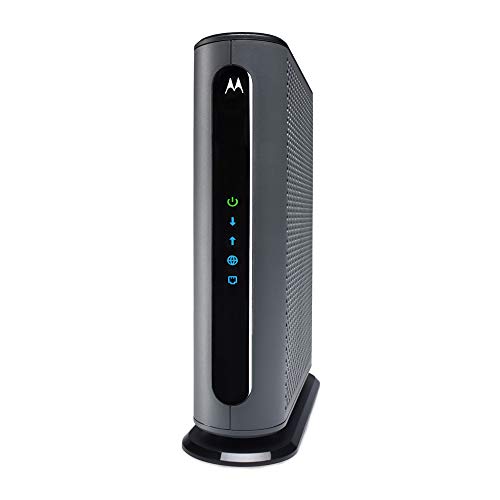
Motorola MB8611
The MB8611 is a DOCSIS 3.1 modem with a single 2.5 Gbps Ethernet port. At $244.99, it’s approved for Comcast Xfinity, Cox, and Spectrum, and it includes Active Queue Management (AQM), a feature that reduces bufferbloat under load. Bufferbloat is what makes video calls stutter when someone else on the network starts a large download. AQM prioritizes packet delivery timing, which matters far more for daily usability than raw peak speeds most users never hit.
The MB8611 carries a 2-year warranty, which is better than the 1-year coverage common on competing modems at this price. It also shows up on Motorola’s compatibility lists as approved for Xfinity Voice plans, which is relevant for households still running landline service through their cable provider.
The single 2.5G port is the one real limitation here. You’re connecting this to one router, and that’s it. For the vast majority of home setups, that’s completely fine.
Read the full Motorola MB8611 review
- DOCSIS 3.1 — supports Gigabit-plus internet plans
- 2.5 Gbps Ethernet port for multi-gig routers
- Works with Comcast Xfinity, Cox, and Spectrum
- Active Queue Management (AQM) for reduced latency
- 2-year warranty
DOCSIS 3.1 modem with 2.5 Gbps port for multi-gig internet — approved for Comcast Xfinity, Cox, and Spectrum. The pick if you have or plan to upgrade to a multi-gig internet plan.
NETGEAR Nighthawk CM2500
The CM2500 comes in at $249.99 and takes a different approach to the same problem. It’s a mid/high-split DOCSIS 3.1 modem rated for up to 2 Gbps download and 1 Gbps upload. The standout hardware difference: two Gigabit Ethernet ports with link aggregation support.
Link aggregation lets you bond those two 1 Gbps ports together, effectively delivering 2 Gbps of throughput to a router that supports LAG (link aggregation). That’s functionally equivalent to the MB8611’s 2.5G port for most use cases, but it requires a router with LAG support to take full advantage of it. If your current router only has a single WAN port and no LAG, you’re using one of those two ports and leaving the other idle.
The mid/high-split DOCSIS 3.1 spec on the CM2500 is worth noting because it’s designed to handle the higher upstream capacity that cable providers are deploying as part of network upgrades. That 1 Gbps upload ceiling is significantly higher than what older DOCSIS 3.1 modems deliver, and upload speed is increasingly relevant for households where multiple people are working from home, uploading large files, or streaming to platforms like Twitch or YouTube.
One hard limitation: the CM2500 is not compatible with Xfinity Voice plans. If you run a voice line through Xfinity, the MB8611 is your option, not this one.
Read the full NETGEAR CM2500 review
- Mid/high-split DOCSIS 3.1 — up to 2 Gbps download, 1 Gbps upload
- Two Gigabit ports with link aggregation support
- Works with Xfinity, Spectrum, Cox, and other major ISPs
- Not compatible with Xfinity Voice plans
- For use in the US only
NETGEAR Nighthawk DOCSIS 3.1 mid/high-split cable modem — approved for today's faster speeds, works with all major cable providers including Xfinity, Spectrum, and Cox for plans up to 2 Gbps.

When 2.5G Is Enough and When You Need More
For cable internet, 2.5G is enough for every plan currently sold to residential customers in the United States. Full stop. Even Xfinity’s top-tier residential plan sits at around 2 Gbps, and the MB8611 or CM2500 can handle that without breaking a sweat.
The real question isn’t 2.5G vs 10G for cable. It’s whether you need multi-gig at all yet.
You need a multi-gig modem now if:
- You’re on or planning to subscribe to an internet plan above 1 Gbps
- Your ISP has notified you of an infrastructure upgrade that pushes your plan above current modem limits
- You’re building out a home network with a multi-gig router and want the modem to keep pace
You can wait if:
- Your current internet plan is 500 Mbps or under
- Your router only has a 1 Gbps WAN port
- Your ISP is not currently offering or planning to offer plans above 1 Gbps in your area
It’s worth checking your ISP’s plan availability before buying. In many suburban and rural service areas, Xfinity and Spectrum still don’t offer above 1.2 Gbps residential service. Buying a 2.5G modem for a 500 Mbps plan doesn’t hurt performance, but it’s spending $250 when a $90-120 DOCSIS 3.1 modem would deliver identical real-world speeds.
For fiber internet, the modem question largely disappears because fiber providers typically supply an ONT (optical network terminal) rather than a cable modem. Multi-gig fiber plans at 2.5G, 5G, or 10G use dedicated hardware from the provider. The modems discussed here are cable-specific.
Cost Per Mbps: The Overlooked Metric
Most buyers compare modems by sticker price. That’s the wrong math. The number that actually matters is cost per usable Mbps, and it shifts significantly depending on what plan you pair the modem with.
Here’s how it works out:
A $120 DOCSIS 3.1 modem on a 1 Gbps plan: roughly $0.12 per Mbps of capacity.
The MB8611 at $244.99 on a 1 Gbps plan: $0.24 per Mbps. You’re paying double for the same delivered speed.
The MB8611 at $244.99 on a 2 Gbps plan: $0.12 per Mbps. Now it makes sense.
The CM2500 at $249.99 on a 2 Gbps plan with LAG-capable router: also around $0.12 per Mbps.
The takeaway: multi-gig modems only justify their price when paired with multi-gig plans. If you’re on a 1 Gbps or slower plan with no immediate plans to upgrade, the cost-per-Mbps math strongly favors a cheaper modem.
There’s also the rental fee offset to consider. Major cable providers charge $10 to $15 per month to rent a modem. At $14/month, a $245 modem pays for itself in about 17 to 18 months. After that, you’re saving money every month. That math holds regardless of speed tier, but it means the break-even window is the same for a $120 modem as it is for the MB8611. The premium for multi-gig is only worth it if you’re actually using multi-gig speeds.
Which One Should You Buy
If you’re on Xfinity, Cox, or Spectrum and currently on or planning to move to a plan above 1 Gbps, the Motorola MB8611 is the cleaner pick for most households. The single 2.5G port works with virtually any modern router without requiring LAG support, the AQM feature genuinely improves day-to-day network responsiveness, and the 2-year warranty adds real value at this price point.
The NETGEAR CM2500 makes more sense if you already have a router with link aggregation support, you’re prioritizing upload speed for work-from-home or content creation, or you want mid/high-split DOCSIS 3.1 for forward compatibility with ISP upstream upgrades. Just confirm you’re not running Xfinity Voice before you buy.
Neither modem makes sense if your plan is under 1 Gbps and you have no near-term reason to upgrade. Save the $250 and revisit this decision when your ISP offers something your current modem can’t handle.
// free tool
Not Sure Which Router Fits Your Home?
Answer four quick questions about your square footage, device count, and usage. The WiFi Recommendation Calculator tells you exactly which system to buy.
Use the WiFi CalculatorAs an Amazon Associate I earn from qualifying purchases. • Full affiliate disclosure