Best Router with Parental Controls in 2026
TP-Link Archer BE3600 at $84.99 has free parental controls that cover every device. Full breakdown of the three best routers for families in 2026.
The TP-Link Archer BE3600 at $84.99 is the right call for most families. It ships with HomeShield parental controls built into the Tether app, the free tier covers content filtering by category and per-device scheduling for every connected device, and none of it requires a monthly subscription. If you want advanced browsing reports and threat intelligence, HomeShield Pro is $5 per month or $55 per year. Most households with younger kids never need to pay for it.
Router-level filtering solves a problem that app-based filters cannot touch: a Nintendo Switch has no app store for parental control software. A smart TV running YouTube does not accept third-party filters. A friend’s phone joining your guest network is invisible to Circle or Google Family Link. When the filter lives on the router, it applies to every device on the network, period. The only bypass is connecting to a different network entirely, which you can address with phone data restrictions separately.
A note on ISP-supplied hardware: most modem-router combos your internet provider ships have no meaningful parental controls, or they lock basic filtering behind an upcharge. Replacing that hardware with a dedicated router is the most effective first step for family network management.
Why Router Controls Get Bypassed (And Which Router Actually Stops It)
Most router parental controls work at the DNS layer. When a device tries to reach a blocked site, the router intercepts the DNS lookup and returns nothing. That approach works reasonably well against young children who don’t know what DNS is. Against an older kid with a smartphone, it has four documented gaps.
Cellular data. If a phone has a mobile data plan, it bypasses your WiFi entirely when carrier signal is usable. Your router sees none of that traffic. No DNS filter ever will.
Free VPN apps. A VPN encrypts all traffic from the device before it leaves, tunneling it to an external server. DNS requests go inside the encrypted tunnel, which means the router filter never sees the domain names being requested.
Manual DNS override. On any phone or laptop, you can change the DNS server in network settings to a public resolver like 8.8.8.8 or 1.1.1.1. Because DNS filtering intercepts at the router’s DNS resolver, pointing the device somewhere else sidesteps the filter entirely. This takes about 30 seconds and is a first-page result for any search on bypassing parental controls.
DNS over HTTPS. Many modern browsers send DNS requests encrypted over HTTPS rather than through the router’s resolver. Chrome, Firefox, and Safari all support this. When enabled, the router cannot see or filter those DNS lookups.
The Gryphon AX takes a different approach: deep packet inspection at the network level. Instead of intercepting DNS lookups, DPI analyzes actual traffic content and identifies sites and categories based on traffic patterns regardless of which DNS resolver the device uses. It catches VPN bypass attempts and encrypted DNS traffic that slip past every DNS-only filter. The cellular bypass problem still applies (nothing solves that short of removing the cellular plan), but the other three gaps close.
This is the core reason the Gryphon AX costs $120 to $140 more than the Archer BE3600. The filtering technology is genuinely different. For families with teenagers who are technically curious, DPI is worth the premium. For families with younger children who need basic content filtering and scheduling, the Archer BE3600’s HomeShield free tier handles that without the extra spend.
How to Choose Between These Three Routers
The decision comes down to three variables: home size, how deep you want the controls to go, and whether you are already running an Alexa-based smart home.
Single-story homes under 2,000 square feet with basic filtering needs: the Archer BE3600 covers the space, supports 60 simultaneous devices according to TP-Link’s published specs, and the free HomeShield tier handles content filtering and scheduling without any ongoing cost. WiFi 7 hardware at $84.99 represents strong long-term value.
Larger homes, or households where managing content access is the primary reason for buying a new router: the Gryphon AX is worth the price difference. Its parental controls are the product, not a secondary feature, and the full implementation is included with no subscription.
Homes with multi-gig internet, Alexa integration, and a budget for premium hardware: the eero Pro 7 3-pack is the ecosystem play. The parental controls are excellent, but they require an eero Plus subscription at $9.99 per month. That adds up to $360 over three years. Calculate that before comparing it to the Gryphon AX on price.
The Three Routers Worth Buying
TP-Link Archer BE3600: Best Budget Pick
- WiFi 7 dual-band router with MLO support
- BE3600: 2882 Mbps (5 GHz) + 688 Mbps (2.4 GHz)
- Dual 2.5 Gbps ports + 3x 1 Gbps LAN
- Covers up to 2,000 sq. ft. for up to 60 devices
- TP-Link HomeShield parental controls and security
- EasyMesh compatible
WiFi 7 router with free HomeShield parental controls, dual 2.5G ports, and EasyMesh support. Best budget WiFi 7 option for families who want parental controls without a subscription.

At $84.99 the Archer BE3600 is a WiFi 7 dual-band router with dual 2.5 Gbps ports and a quad-core 2.0 GHz processor, according to TP-Link’s published specifications. The free HomeShield tier in the Tether app gives you content filtering by category, per-device scheduling, and on-demand internet pause for any device. That last control is practically the most useful feature in the lineup: one tap in the app cuts a specific device off the network immediately, no argument required.
HomeShield Pro at $5 per month or $55 per year adds detailed browsing reports, advanced threat protection, and real-time IoT security alerts. The detailed reports become genuinely useful with older kids, giving you visibility into which categories of sites are being accessed. But the free tier is sufficient for content filtering and scheduling in most households.
Per-device profile management works as documented: create a profile, assign devices to it, and set a schedule. The schedule applies to every device in that profile simultaneously. Changing a bedtime rule updates all assigned devices at once.
Coverage is rated at 2,000 square feet by TP-Link, which fits a standard single-story home or a compact two-story layout. For larger homes, TP-Link’s EasyMesh extenders can expand coverage while keeping the HomeShield controls active across the whole network.
Gryphon AX: Best if Parental Controls Are the Point
- AX4300 tri-band WiFi 6 mesh router
- Advanced parental controls with content filtering and scheduling
- Next-generation firewall with malware and ransomware protection
- 3000 sq. ft. per router — expandable
- No monthly fee for parental controls or security features
Mesh router built around family safety and parental controls — advanced content filters, screen time scheduling, and next-gen firewall included at no monthly fee.
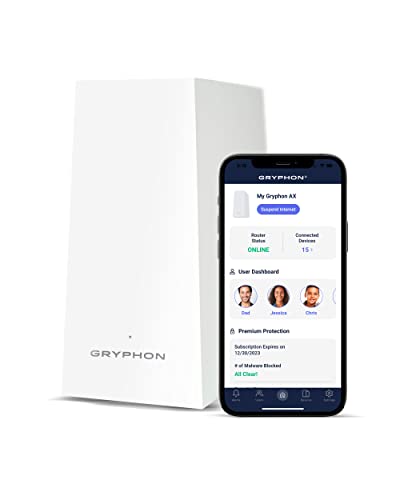
The Gryphon AX is priced between $199 and $229 and exists specifically as a family-focused router. Advanced content filtering, screen time scheduling, per-device internet pause, and cybersecurity monitoring are all included with no subscription, no teaser tier, and no feature unlocks. That is the full product at purchase price.
The content category system on the Gryphon is more granular than HomeShield’s free tier, and the scheduling supports separate rule sets for weekdays versus weekends, which matters when the kids have a different schedule on Saturday. Cybersecurity monitoring operates at the network level, catching malware and phishing attempts before they reach devices rather than relying on software installed on each machine.
The Gryphon also supports mesh expansion. Adding nodes extends coverage while keeping the same filtering rules active across the entire network, with no additional configuration for each new node. For a larger home where coverage and content management are both concerns, this is the more practical purchase than the Archer BE3600 plus a subscription elsewhere.
The $120 to $145 premium over the Archer BE3600 is justified when parental controls are the main driver of the purchase. If you primarily want faster WiFi and adequate basic filtering, the Archer is the better value.
eero Pro 7: Best Premium Mesh for Alexa Households
- WiFi 7 tri-band with Multi-Link Operation (MLO)
- Supports internet plans up to 5 Gbps with two 5 GbE ports
- Three-node kit: 600+ devices
- 6000 sq. ft.
- TrueMesh + TrueRoam + TrueChannel software
- FCC conditional approval through October 2027
- 3-year warranty
WiFi 7 tri-band mesh system with FCC conditional approval — the premium choice for Alexa households needing whole-home coverage.

The eero Pro 7 3-pack at $579.99 covers 6,000 square feet and is rated for 600 or more connected devices, per Amazon’s published specifications. Each node includes two auto-sensing 5 GbE ports, tri-band WiFi 7 with multi-link operation, and support for internet plans up to 5 Gbps. For large homes with high device counts and fast internet, the hardware performance is genuinely strong.
The parental controls caveat is the most important thing to understand before buying: eero’s content filtering, scheduling, and per-profile controls all require an eero Plus subscription at $9.99 per month. Without it, you get basic network management and nothing else in terms of family controls. Over a three-year ownership period, that subscription adds $360 to the total cost. The Gryphon AX at $229 with no subscription is less expensive over the same period if parental controls are your primary need.
eero Plus bundles additional services alongside parental controls: Advanced Security, ad blocking, Malwarebytes, 1Password, and a Guardian-powered VPN, according to Amazon’s product page. If your household would subscribe to some of those services independently, the subscription math improves. If you are paying $9.99 per month purely for content filtering, you are overpaying compared to alternatives.
The Alexa integration is functional and practical for households already running Echo devices. Voice commands for pausing network access, checking which devices are connected, and managing profiles work reliably according to verified user reviews. For homes already committed to the Amazon ecosystem, that integration is a legitimate factor in the decision.
What the Free vs. Paid Tiers Actually Cover
| Feature | Archer BE3600 Free | HomeShield Pro ($5/mo) | Gryphon AX (included) | eero Plus ($9.99/mo) |
|---|---|---|---|---|
| Content filtering | Basic categories | Advanced categories | Advanced categories | Advanced categories |
| Per-device scheduling | Yes | Yes | Yes | Yes |
| Pause internet on demand | Yes | Yes | Yes | Yes |
| Detailed usage reports | No | Yes | Yes | Yes |
| Cybersecurity / threat protection | Basic | Advanced | Yes | Yes |
| Ad blocking | No | No | No | Yes |
| Annual cost | $0 | $55 | $0 | $120 |
The Gryphon AX wins the value comparison on parental controls specifically. Everything the other options charge a subscription for is included in the purchase price. The only reasons to choose differently are if hardware specs, coverage area, or ecosystem integration outweigh control depth in your priorities.
The Bottom Line
Buy the TP-Link Archer BE3600 at $84.99 for homes under 2,000 square feet where free parental controls and WiFi 7 hardware are the priority. The free HomeShield tier handles content filtering and scheduling without any ongoing cost, and the hardware will handle WiFi 7 speeds well into the next hardware cycle.
Buy the Gryphon AX at $199 to $229 when parental controls are the primary reason you are replacing your current router. No monthly fee, more granular content categories, weekday/weekend scheduling, and mesh expansion capability for larger homes. This is the right tool if the goal is control depth rather than raw network performance.
Buy the eero Pro 7 3-pack at $579.99 for large homes with multi-gig internet, high device counts, and an existing Alexa ecosystem. Budget $9.99 per month for eero Plus into your total cost calculation. The hardware is exceptional. The parental controls are not free.
All three routers support per-device and per-profile scheduling, and all three let you cut a specific device off the network on demand. That single feature changes how household screen time conversations go, and it is available at every price point on this list.
Use the WiFi Recommendation Calculator to get a specific router or mesh system recommendation based on your home size, floors, and number of connected devices.
// free tool
Not Sure Which Router Fits Your Home?
Answer four quick questions about your square footage, device count, and usage. The WiFi Recommendation Calculator tells you exactly which system to buy.
Use the WiFi CalculatorAs an Amazon Associate I earn from qualifying purchases. • Full affiliate disclosure