Verizon Fios G3100 Router: Keep It or Replace It With Your Own Gear
The Fios G3100 isn't terrible, but it has real limits. Here's exactly when to keep it and which routers are worth the swap.
If you searched for “Verizon Fios home router G3100,” you’re probably staring at that white box Verizon handed you and wondering whether it’s worth keeping or whether you should swap it out for something you actually own. That’s a fair question, and most articles either talk you into keeping it or give you a generic “buy your own router” pep talk with no Fios-specific guidance at all. Neither of those is helpful.
Here’s what I’m going to do instead: tell you honestly what the G3100 gets right, where it genuinely fails tech-savvy households, walk through the compatibility gotchas that trip people up when switching routers on Fios, and then give you two specific recommendations depending on what your household actually needs.
What the G3100 Actually Does Well
Let’s be fair to this thing. The G3100 is not garbage. Verizon ships a tri-band WiFi 6 router with 4x4 MIMO on the 5 GHz band, a 10G SFP+ port for multi-gig Fios plans, and a pretty solid 2.4 GHz radio that reaches into awkward corners of a house better than some third-party alternatives I’ve tested. For a router that Verizon essentially includes with your service, it punches above what cable ISPs typically hand you.
Out-of-the-box setup is genuinely painless. The My Fios app handles initial configuration, the router negotiates its own MoCA connection to the ONT without you touching a thing, and average families can get up and running in under ten minutes. The hardware specs aren’t embarrassing either: a 1.8 GHz quad-core ARM processor and 512 MB of RAM keep things moving at gigabit speeds without breaking a sweat.
For a household that just wants WiFi and doesn’t tinker, the G3100 does its job. I’ll acknowledge that plainly.
Where the G3100 Breaks Down
Here’s where it gets frustrating if you’re the kind of person reading a networking article on a Saturday afternoon.
No VLAN support worth talking about. The G3100’s admin interface gives you almost no control over network segmentation. You can’t properly isolate your IoT devices, your work laptop, and your kids’ tablets onto separate logical networks. If you care about keeping your smart home devices from being a backdoor into your main network, the G3100 is not your friend. I’ve written about how to set up VLANs for home network segmentation if you want to understand why this actually matters, and it matters more than most people realize once you’ve got 30-plus devices on a network.
Parental controls are surface-level at best. The built-in parental controls top out at basic content category blocking and scheduled downtime, and the scheduling interface feels like it was designed in 2014. There’s no per-device application filtering, no DNS-layer protection, no way to pause a specific kid’s device from your phone without digging through menus. If you have school-aged kids and care about what they’re accessing, you will outgrow these controls fast. Check out our guide to the best routers for parental controls in 2026 if this is your primary concern.
QoS is limited and blunt. Quality of Service on the G3100 is device-priority-based, not application-aware. You can say “this device gets priority,” but you can’t say “video calls on this laptop get priority over YouTube on every other device.” For a household where someone is working from home while kids are streaming and gaming, that distinction matters during peak hours.
You don’t own it. Verizon can push firmware updates that change behavior. There are no alternative firmware options. If a feature disappears or a bug shows up, you’re waiting on Verizon’s timeline. That’s a real limitation that rarely gets called out.
Fios-Specific Compatibility Gotchas Before You Buy
This is the section most articles skip, and it’s the one that bites people. Fios uses a fiber ONT (Optical Network Terminal) on the side of your house or in a utility closet, and the G3100 connects to it either via Ethernet or MoCA (Multimedia over Coax Alliance, which uses your existing coax cable wiring).
If your ONT delivers Ethernet, you’re in good shape. Almost any third-party router works. You plug your new router’s WAN port into the ONT’s Ethernet port, set it to obtain an IP via DHCP, and you’re done. The catch: some ONTs are configured to deliver MoCA only, meaning you’d need to call Verizon to switch the ONT to Ethernet output. That call usually takes about 15 minutes and the tech can do it remotely, but you have to ask for it.
If you’re on the coax-only setup, it gets messier. You’d need a MoCA adapter between the coax wall outlet and your new router’s WAN port. A MoCA 2.5 adapter runs around $60-80 and works fine, but it’s an extra piece of hardware and an extra point of failure. Know what you’re walking into before you buy a third-party router.
TV set-top boxes. If you have Fios TV (not just Fios Internet), some of the older TV boxes rely on MoCA networking to communicate with the router. Replacing the G3100 can break TV box functionality unless you either keep the G3100 in bridge mode (which negates most of the benefit of replacing it) or use a MoCA adapter to maintain that coax network for the TV boxes while your new router handles everything else. If you’re Fios Internet-only, none of this applies to you.
IP passthrough vs. double NAT. If you put a new router behind the G3100 without putting the G3100 in bridge/IP passthrough mode, you’ll get double NAT. Gaming, certain VPN setups, and port forwarding will behave badly. Call Verizon or use the admin interface to enable IP passthrough to your new router’s MAC address before you write off third-party hardware as “not working.”
ASUS RT-BE86U: The Power-User Swap for Fios Households
At $227, the ASUS RT-BE86U is the only WiFi 7 router I’d actually recommend at this price point without feeling like I’m overselling it. Most WiFi 7 gear is still priced like a luxury item. This one is priced like a solid WiFi 6E router from 18 months ago, and it ships with a 10G Ethernet port that matches what your multi-gig Fios plan can actually deliver.
The specs that matter for Fios subscribers specifically: that 10G WAN/LAN port means if you’re on Fios 2 Gig, you’re not leaving speed on the table with a 2.5G bottleneck. Multi-Link Operation (MLO) across 2.4 and 5 GHz means devices can bond bands for better throughput and lower latency without you doing anything. The 2.6 GHz quad-core processor with 1 GB of RAM handles full gigabit routing without throttling under load.
For the household that wants VLANs, it supports full 802.1q VLAN tagging. You can segment your network properly. AiProtection Pro from Trend Micro is baked in at no subscription cost, which is worth noting because a lot of competitors charge $50-100 per year for equivalent security features. Coverage hits around 2,750 square feet, and if you need more, it drops into ASUS AiMesh so you can add nodes.
This is the swap I’d make if my household has a multi-gig Fios plan, a mix of work and personal devices, and anyone who wants to actually control what’s on their network.
- WiFi 7 with Multi-Link Operation (MLO) on 2.4 + 5 GHz
- 10G Ethernet WAN/LAN port
- up to 20G combined wired
- 2.6 GHz quad-core 64-bit CPU
- 1 GB RAM
- Covers up to 2
- 750 sqft; expandable via ASUS AiMesh
- AiProtection Pro powered by Trend Micro
- subscription-free
The only WiFi 7 router at a price that makes sense for most buyers. At $227 it's priced like a mid-range WiFi 6 device but ships with a 10G port and full MLO support. Buy it once, use it through 2030.

Gryphon AX: The Family-Focused Alternative
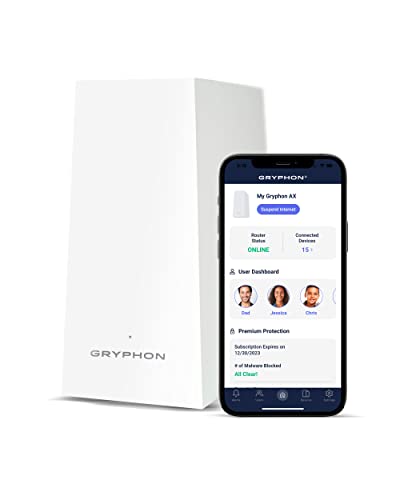
The Gryphon AX costs $299, which is more than the ASUS, and I want to be upfront that you’re paying for a specific set of features rather than raw performance. If parental controls are your number-one reason for replacing the G3100, this is the router I’d point you toward.
Where most routers treat parental controls as an afterthought, the Gryphon AX treats them as the whole point. Content filtering happens at the DNS level for every device on your network, including devices that try to use their own DNS servers to dodge filters. Screen time scheduling is per-device and actually works. The next-generation firewall includes malware and ransomware protection that the G3100 doesn’t come close to touching. None of it requires a monthly subscription, which matters when you’re already paying $80-plus a month for internet service.
Coverage is rated at 3,000 square feet per unit, and it’s designed to expand as a mesh system if you need to cover more ground. For Fios compatibility, it plays nicely with Ethernet handoff from the ONT and handles IP passthrough from the G3100 without drama if you go that route.
Read the full Gryphon AX review if you want a deeper look at how the parental controls actually perform day-to-day.
- AX4300 tri-band WiFi 6 mesh router
- Advanced parental controls with content filtering and scheduling
- Next-generation firewall with malware and ransomware protection
- 3000 sq. ft. per router — expandable
- No monthly fee for parental controls or security features
Mesh router built around family safety and parental controls — advanced content filters, screen time scheduling, and next-gen firewall included at no monthly fee.
My Recommendation Based on Your Household Type
Here’s the direct answer you came for.
Keep the G3100 if: You’re on a standard gigabit Fios plan, you don’t have kids who need real content filtering, you have no interest in network segmentation, and you’d rather have one less thing to manage. It’s a capable router for that use case and there’s no shame in using what works.
Buy the ASUS RT-BE86U if: You’re on a multi-gig Fios plan, you want VLAN support and proper network segmentation, you run a home office alongside family devices, or you just want to own your gear outright and stop depending on Verizon firmware decisions. At $227 for WiFi 7 with a 10G port, the value math is hard to argue with.
Buy the Gryphon AX if: You have kids at home and parental controls are your primary motivation for switching. The content filtering is genuinely better than anything you’ll configure yourself on a consumer router, and getting it built-in at no subscription fee is a real advantage over tacking a third-party DNS filter onto a different router.
Either way, make that call to Verizon first to confirm your ONT setup before anything ships to your door.
// free tool
Not Sure Which Router Fits Your Home?
Answer four quick questions about your square footage, device count, and usage. The WiFi Recommendation Calculator tells you exactly which system to buy.
Use the WiFi CalculatorAs an Amazon Associate I earn from qualifying purchases. • Full affiliate disclosure