MoCA Wired Backhaul for Mesh Routers: Skip Ethernet, Use Your Coax
MoCA turns existing coax cable into a wired mesh backhaul. Here's which routers support it, real speed gains, and whether your home qualifies.
MoCA Wired Backhaul for Mesh Routers: Skip Ethernet, Use Your Coax
Running Ethernet through walls is the gold standard for mesh backhaul. It’s also something most people never actually do, because fishing cable through finished drywall is a miserable project. MoCA is the realistic alternative, and it’s genuinely underused.
MoCA (Multimedia over Coax Alliance) sends network traffic over the coaxial cable already installed in millions of homes from the cable TV era. That coax running to your living room, bedroom, and basement? It can carry a high-speed backhaul signal to your mesh nodes without touching a single wall. MoCA 2.5 tops out at 2.5 Gbps theoretical throughput, and real-world aggregate speeds reported across professional reviews consistently land in the 1–2 Gbps range on a single connection. That completely destroys what you’d get from a wireless backhaul, which typically caps out at 800 Mbps–1.2 Gbps on a good tri-band system, and frequently drops lower when walls, interference, or distance get involved.
This guide covers how MoCA backhaul actually works, which mesh systems pair well with it, which adapter kit to buy, and the home conditions where it makes the most sense.
How MoCA Backhaul Actually Works
A MoCA adapter converts your coax into an Ethernet-over-coax link. You place one adapter at your router (connecting it to both the coax and your router’s WAN or LAN port), and a second adapter at each satellite node location (connecting coax to the node’s Ethernet port). The adapters communicate over the coaxial cable at a frequency range that doesn’t interfere with your cable internet signal.
The result: your mesh nodes get a wired backhaul connection without any new cable runs. From the router’s perspective, the nodes look like they’re plugged directly into a switch. Latency stays low, throughput stays consistent, and the wireless bands on your mesh nodes are freed up entirely for client devices instead of splitting duty between clients and backhaul.
One important detail: you need a point of presence (coax outlet) near both your router and each satellite node location. Homes built during the cable TV boom of the 1980s through 2000s typically have coax in nearly every room. Newer construction and apartments are less predictable.
You also need a MoCA filter installed at the point where coax enters your home. This keeps your MoCA signal from leaking onto the cable company’s network. Most good adapter kits include one.
The Adapter You Need: ScreenBeam Bonded MoCA 2.5
The ScreenBeam ECB7250K02 starter kit ships as a two-adapter set, which is exactly what you need to get started. Each adapter runs MoCA 2.5, with a theoretical maximum of 2.5 Gbps and a 2.5 GbE Ethernet port to match. Backward compatibility with 10/100/1000 Mbps means older routers and nodes aren’t left out.
At $139.99 for two adapters, this is the most cost-effective entry point into MoCA 2.5. If you want to extend to additional nodes, the spec supports up to 16 nodes on the same coax network. You’d add individual adapters as needed for each satellite location. ScreenBeam’s MoCA 2.5 spec delivers noticeably better headroom than older MoCA 2.0 adapters, especially if you’re running a multi-gig fiber plan or a mesh system with 2.5 GbE ports.
- 2.5 Gbps max speed
- Ethernet over coax
- MoCA 2.5 compatible
- Supports up to 16 nodes
- 2.5Gbps network ethernet port
- Backwards compatible with 10/100/1000 Mbps
MoCA 2.5 adapter kit delivering up to 2.5 Gbps internet over existing coax cables

Which Mesh Systems Pair Well with MoCA Backhaul
Any mesh system with a dedicated Ethernet port on its satellite nodes can use MoCA as a wired backhaul. The adapter handles the coax-to-Ethernet conversion, so the router just sees a standard wired connection. That said, some mesh systems handle wired backhaul more elegantly than others, and a few specific models are worth calling out.
eero Pro 6E (3-Pack): Best Match for MoCA 2.5 Speeds
The eero Pro 6E is one of the best mesh systems to pair with MoCA 2.5 backhaul because each node includes a 2.5 Gbps Ethernet port. That matches the ScreenBeam adapter’s output exactly, so you’re not bottlenecked at the node. The three-node kit covers up to 6,000 square feet, handles 100+ devices, and uses TrueMesh routing to manage traffic intelligently across the network. The dedicated 6 GHz band in the tri-band configuration is already a strong backhaul candidate on its own, but replacing wireless backhaul with MoCA over coax frees that 6 GHz band for client devices entirely.
Published specs confirm eero Pro 6E supports wired Ethernet backhaul, and the 2.5 GbE port means you’re not leaving performance on the table when running MoCA 2.5.
- WiFi 6E tri-band with dedicated 6 GHz backhaul
- Up to 6,000 sqft coverage, 100+ devices
- 2.5 Gbps Ethernet port for multi-gig wired plans
- TrueMesh routing with app-based management
- Native Amazon Alexa integration
The coverage pick for larger homes or complex device mixes. Three nodes covering 6,000 sqft with a 2.5 Gbps Ethernet port. The step up from the Deco XE75 if you have 50 or more devices, run a home lab, or have multi-gig fiber.

eero Pro 7: If You Have Multi-Gig Fiber and Want to Future-Proof
The eero Pro 7 takes things further with WiFi 7 and two 5 GbE ports per node. That’s overkill for most homes, but if you’re already on a 2 Gbps or faster fiber plan, the extra port headroom matters. The three-node kit is rated for 6,000 square feet and 600+ devices with Multi-Link Operation for improved throughput and latency management under load. For MoCA purposes, the 5 GbE ports exceed what MoCA 2.5 can deliver, so the adapter becomes the limiting factor, not the node.
At $699.99, this is a premium investment. The performance ceiling is real, but most homes with standard gigabit or 1.2 Gbps cable internet won’t saturate MoCA 2.5 anyway.
- WiFi 7 tri-band with Multi-Link Operation (MLO)
- Supports internet plans up to 5 Gbps with two 5 GbE ports
- Three-node kit: 600+ devices
- 6000 sq. ft.
- TrueMesh + TrueRoam + TrueChannel software
- FCC conditional approval through October 2027
- 3-year warranty
WiFi 7 tri-band mesh system with FCC conditional approval — the premium choice for Alexa households needing whole-home coverage.

Linksys Velop Pro 6E (2-Pack): Strong Wired Backhaul Candidate
The Linksys Velop Pro 6E runs tri-band WiFi 6E with AXE5400 speeds and includes Ethernet ports on each node for wired backhaul. Linksys has documented wired backhaul support across the Velop Pro lineup, and the 6 GHz band, when freed from backhaul duty by a MoCA connection, serves as a clean high-throughput lane for nearby devices. The two-node kit at $299.99 covers most medium to large single-story homes. Beamforming and cognitive mesh technology help the system adapt channel selection automatically.
If you’re comparing Velop options in more detail, the Linksys Velop vs TP-Link Deco comparison breaks down where each system wins.
- Beamforming
- Guest Mode
- Internet Security
- LED Indicator
- Parental Control
- Tri-Band
- WiFI 6E
- 6GHZ
Linksys Velop Pro 6E WiFi Mesh System | Two Cognitive Mesh Tri-Band routers with 5.4 Gbps (AXE5400) Speed

Linksys Velop WiFi 6 (3-Pack): Budget-Friendly Entry Point
If you want MoCA backhaul without a premium price tag, the Velop WiFi 6 three-pack at $159 covers the basics. Ethernet backhaul is supported on these nodes, which means plugging in a MoCA adapter works as intended. The trade-off is that these nodes use standard gigabit Ethernet ports, so you’re capped at 1 Gbps on the backhaul link regardless of what your MoCA adapter can push. For homes on a 400–800 Mbps internet plan, that’s a non-issue.
- LIGHTNING FAST WIFI SPEEDS
- POWERFUL MESH WIFI 6 COVERAGE
- EASY SETUP & CONTROL
- SECURITY OUT OF THE BOX
Velop WIFI 6 Mesh, super fast with out of the box security, easy to setup.

Gryphon AX: Best Option If Parental Controls Drive Your Decision
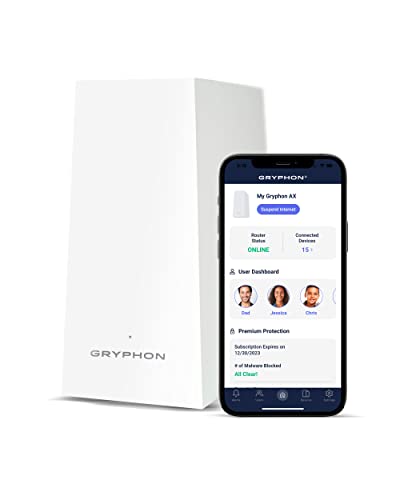
The Gryphon AX isn’t primarily a MoCA story, but it’s worth including here because it supports Ethernet backhaul and is the strongest option available if family content filtering is a hard requirement. The AX4300 tri-band WiFi 6 system covers 3,000 square feet per node and includes advanced parental controls with content filtering and scheduling, plus a next-generation firewall with malware and ransomware protection, all at no monthly fee. Pair it with MoCA adapters and you get a wired-backhaul mesh system that also handles network-level security without a subscription.
Most mesh systems charge monthly for comparable parental control features. Gryphon builds them in. For a home with kids who have devices scattered across multiple floors, that combination of wired backhaul reliability and built-in content filtering is practical.
- AX4300 tri-band WiFi 6 mesh router
- Advanced parental controls with content filtering and scheduling
- Next-generation firewall with malware and ransomware protection
- 3000 sq. ft. per router — expandable
- No monthly fee for parental controls or security features
Mesh router built around family safety and parental controls — advanced content filters, screen time scheduling, and next-gen firewall included at no monthly fee.
Homes That Benefit Most from MoCA Backhaul
MoCA makes the most sense in specific situations. Here’s where it actually pays off:
Multi-story homes with coax on every floor. Wireless backhaul degrades with distance and floors between nodes. A two-story or three-story home with coax outlets upstairs and downstairs is an ideal MoCA candidate. The backhaul signal travels through wiring, not air, so floors and walls become irrelevant.
Homes with cable TV infrastructure but no accessible Ethernet runs. This is the majority of American homes built between 1985 and 2005. Coax is in the walls already. MoCA lets you use it.
Large homes where wireless backhaul creates a coverage gap. If your farthest node is at the edge of wireless range from the primary router, backhaul reliability drops significantly. Check the best mesh WiFi for large homes guide for more on coverage strategy, but the short version is: wired backhaul solves range problems that no amount of antenna tuning fixes.
Home offices needing reliable, low-latency connections. Video calls and VPN tunnels are brutally unforgiving about jitter. If your home office coax outlet is near where you work, running MoCA backhaul to a dedicated node at that location delivers latency and reliability that wireless backhaul can’t match. More on multi-gig wired options for home offices is covered at home office multi gig ethernet options 2026.
Renters who can’t run Ethernet. MoCA uses infrastructure already in the walls. No drilling, no fishing cable, no landlord conversations.
What MoCA Won’t Solve
MoCA requires coax to already be in place and accessible where you need nodes. If your home doesn’t have coax in the rooms where you’d place satellite nodes, this approach doesn’t work. You’d need either Ethernet runs or wireless backhaul.
MoCA also doesn’t help with the main router-to-modem connection on most cable setups, since the cable modem is already occupying that coax run. You can typically work around this with a coax splitter, but the specifics depend on your modem and ISP setup. Review your installer documentation or ScreenBeam’s setup guide before purchasing.
Finally, MoCA 2.5 maxes out at 2.5 Gbps aggregate. If you’re on a symmetrical 5 Gbps fiber plan and need full throughput across your backhaul, MoCA is a constraint. For those edge cases, the home office multi-gig Ethernet guide covers the full picture on running actual Cat6A or 2.5 GbE over structured cabling.
The Setup Is Simpler Than You Think
Place one ScreenBeam adapter at your router, one at each satellite node location, connect coax in and Ethernet out on each adapter, install the MoCA filter at your home’s coax entry point, and you’re done. No firmware changes, no special configuration. The mesh system sees wired Ethernet connections and treats them accordingly.
For most homes, the entire process takes under 30 minutes. Compare that to a weekend of running Ethernet through walls, and MoCA’s appeal is obvious. If you’ve been putting off a proper wired backhaul because of the installation burden, this is the setup that actually gets done. For more side-by-side mesh comparisons before you commit, the mesh WiFi comparison covering Deco, eero, and Linksys is worth a read.
// free tool
Not Sure Which Router Fits Your Home?
Answer four quick questions about your square footage, device count, and usage. The WiFi Recommendation Calculator tells you exactly which system to buy.
Use the WiFi CalculatorAs an Amazon Associate I earn from qualifying purchases. • Full affiliate disclosure