Security Cameras for Renters: No-Drill Indoor and Outdoor Options That Don't Void Your Lease
Security cameras for renters who can't drill or wire. No-drill indoor and outdoor picks, battery life reality, and full kits under $150 and $300.
Renting puts you in a specific security bind. You want cameras covering your front door, maybe a ground-floor window, possibly a parking spot, but your lease almost certainly prohibits drilling into exterior brick, stucco, or siding. Miss that clause, and you’re looking at deposit deductions that cost more than the cameras themselves. The good news: the wireless camera market has matured enough that you can cover most of a rental property without touching a single wall anchor, and you can uninstall everything in under 30 minutes when move-out day arrives.
Here is exactly what that looks like in practice.
What Renters Can and Cannot Install Without Losing a Security Deposit
The general rule is simple: if it leaves a hole, expect a charge. Exterior walls, doorframes, and trim are all high-risk surfaces. Most leases also prohibit permanent adhesive that damages paint, which rules out industrial mounting tape on interior drywall unless you use 3M Command-style strips rated for the camera’s weight.
What is almost always permissible:
- Freestanding indoor cameras placed on shelves, counters, or furniture
- Magnetic base cameras attached to metal door frames, appliances, or window sills
- Window-mount cameras that suction or clamp to glass from the inside, pointing outward
- Battery-powered doorbell cameras that use existing screw holes from the original doorbell plate or adhesive backing kits
- Plug-in indoor cameras routed along baseboards with removable cable clips
What is almost always off the table: running PoE cable through walls, installing an NVR with hardwired conduit, mounting brackets with lag bolts into exterior siding, and cutting new holes for cable pass-throughs. If you want to understand the full NVR and local storage picture, the guide at /articles/local-security-camera-nvr-no-subscription covers that hardware in detail.
Indoor Wireless Cameras: Resolution, Local Storage, and Subscription Cost Reality
Indoor cameras are the easiest renter win. A plug-in camera on a bookshelf covering the living room or front door entry requires zero installation and moves with you. The key specs to evaluate are resolution, whether the camera stores footage locally on a microSD card, and what the cloud subscription actually costs over a year.
A 2K or higher resolution camera matters because you need enough detail to identify faces and read package labels. Cameras below 1080p are usable but often fail on that second requirement.
On subscriptions: Ring’s Basic Plan runs $4.99 per month or $49.99 per year per device, which adds up fast if you buy three cameras. Google’s Nest Aware starts at $8 per month. Neither is outrageous, but a household on a tight budget should prioritize cameras with reliable local microSD storage so cloud is optional rather than mandatory.
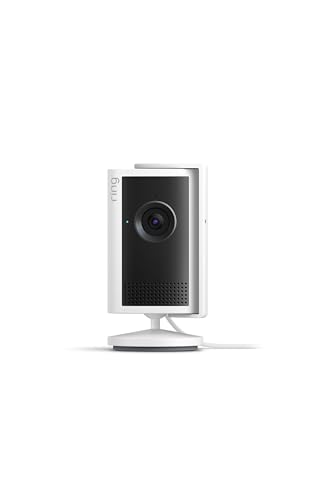
Ring Indoor Cam (Wired)
Ring’s wired indoor camera at $59.99 shoots in Retinal 2K, includes 4x enhanced zoom, and handles low-light reasonably well with its Low-Light Sight feature. It is plug-in only, which is perfect for renters. The tradeoff is the Ring ecosystem: you get 30 days of event history with a Basic subscription, but without it you only get live view and motion alerts with no saved clips. For a renter who already pays for Ring Protect on a doorbell, adding this camera to the same plan makes financial sense. For someone starting from scratch, factor $49.99 per year into the real cost.
- Retinal 2K for crisp
- true-to-life video quality
- 4x Enhanced Zoom
- Low-Light Sight
Capture it all with Retinal 2K video — See every detail of your home or business in full view — powered by Retinal 2K. Retinal 2K for crisp, true-to-life video quality, 4x Enhanced Zoom, Low-Light Sight
Google Nest Cam (Wired, 3rd Gen, 2025)
The 2025 Nest Cam at $99.99 shoots 2K HDR, the highest resolution Google has put in this line. It includes encrypted video storage, two-step verification tied to your Google Account, two-way audio, and night vision. Nest Aware Basic at $8 per month gives you 30 days of event history. The Gemini integration in this generation adds more accurate event descriptions in the app. If you are already in the Google Home ecosystem, the compatibility and app experience are genuinely better integrated than most alternatives. The camera is wired, so placement is limited to outlet proximity, but no drilling required.
- encrypted video
- two-step verification
- and enhanced security through your Google Account
- ideo is crisp and clear in 2K HDR
- Nest Cam’s highest resolution yet
Google Nest Cam Indoor (Wired, 3rd Gen) - Security Camera with 2K Video and Gemini, Night Vision, 2-Way Audio, Works with Google Home - 2025 Model

Outdoor Camera Options Without Drilling: Window Mounts, Magnetic Bases, and Adhesive Limits
Outdoor coverage is harder for renters but not impossible. Three approaches work well:
Window-facing indoor cameras: A 2K indoor camera placed on a window sill pointing outward covers a driveway or front walkway without touching any exterior surface. Night vision takes a quality hit through glass because IR light reflects back off the pane. Look for cameras with color night vision or ambient light modes rather than IR-heavy designs if this is your primary outdoor strategy.
Magnetic base cameras: Several battery-powered cameras ship with magnetic mounts that attach to metal surfaces. A metal door frame, a mailbox post, or the metal housing of an outdoor light fixture can work. Eave edges on carports are often steel-framed and accessible without any fasteners.
Adhesive mounts: 3M VHB tape and similar products can hold a lightweight camera on brick, vinyl siding, or painted surfaces, but the weight limit is strict. Most camera-specific adhesive mounting kits are rated for cameras under 10 ounces on smooth surfaces. Rough brick and textured stucco dramatically reduce holding strength. In cold climates, adhesive strength drops significantly below 40 degrees Fahrenheit. Use adhesive mounts as supplemental, not primary outdoor mounting.
Tapo 2K+ Outdoor Camera C320WS
The Tapo C320WS sits at $34.97, which makes it the most accessible outdoor option here, but it is a wired camera. That matters for renters because placement requires an outdoor outlet or a cable run through a door gap using a flat cable pass-through. The specs are strong for the price: 4MP QHD (2K+) resolution, IP66 weatherproofing, dual spotlights, 850nm IR with 98-foot night vision range, AI detection for persons and vehicles, two-way audio with a built-in siren, and local microSD storage up to 512GB with optional cloud backup. For a ground-floor apartment with an accessible outdoor outlet near the door, this camera mounted on the exterior wall adjacent to the outlet (using the included bracket with appropriate adhesive or a landlord-approved anchor) covers a lot of ground at a low price. Tapo’s app does not require a paid subscription for local storage or basic alerts.
- 2K 4MP QHD resolution
- IP66 weatherproof rating
- Wi-Fi connectivity
- Dual spotlights with 850nm IR up to 98 feet
- Person/Vehicle/Motion detection
- 2-way audio with built-in siren
- Local microSD storage up to 512GB or cloud backup
Outdoor wired security camera with 2K resolution, starlight night vision, and AI detection for persons and vehicles.

Battery Life Reality: How Often You Actually Recharge in a Real Outdoor Install
Battery-powered outdoor cameras are the cleanest renter option for truly wire-free placement, but the marketing specs do not reflect real-world recharge frequency. Most manufacturers cite battery life in months based on very low event counts, typically 10 to 20 motion events per day.
A camera covering a front walkway or apartment parking area in a busy location will trigger far more often. At 50 to 100 events per day, a battery-powered camera with a 6,000mAh battery may need recharging every 2 to 4 weeks rather than the 3 to 6 months on the box. In winter, lithium batteries also lose capacity in sustained cold, which shortens recharge intervals further.
The practical takeaway: if you go battery-powered outdoors, plan for monthly recharging in active locations, buy a camera with a removable battery so you can swap rather than dismount, and consider a solar panel accessory if your camera placement gets direct sunlight for at least 3 to 4 hours daily. Most major battery camera lines now have compatible solar panel accessories in the $20 to $30 range.
Cloud vs. Local Storage for Renter Setups: SD Card Reliability and What Happens if the Camera Gets Stolen
Local microSD storage is appealing because it avoids subscription fees, but there is a specific renter vulnerability: if a camera mounted near a door or window gets stolen, the footage goes with it. Cloud storage solves this because events upload before or during an incident, but it adds ongoing cost.
The practical middle ground is a camera that does both: write continuously or on motion to a microSD card for local archive, and push event clips to cloud for off-device backup. Tapo’s platform does this. Nest Cam does this. Ring does this only with an active subscription.
On SD card reliability: cards in outdoor cameras that run continuous recording in temperature extremes wear out faster than cards in indoor cameras. High-endurance microSD cards (labeled as such by Samsung, SanDisk, and Kingston) are rated for much higher write cycles than standard cards and cost only a few dollars more. For any camera doing continuous local recording, a high-endurance card is worth the minor price difference.
Doorbell Cameras for Renters: Video Doorbells That Work Without Hardwiring
Most rental units have an existing doorbell button with wiring, but the transformer powering that wiring may not supply enough voltage for a video doorbell, and landlords frequently object to replacing the existing hardware. Battery-powered video doorbells eliminate both problems. They mount over the existing doorbell location with a small bracket and two screws into the doorframe trim (far less invasive than a new exterior mount), or use an adhesive backing kit on the door trim itself.
Ring’s Battery Video Doorbell line, Eufy’s Video Doorbell series, and Arlo’s Essential Video Doorbell all offer battery-powered versions with no hardwiring required. Look for 1080p or higher resolution, a package detection mode, and a pre-roll feature that captures a few seconds before the motion trigger so you see the full approach, not just a person already at the door.
Recommended Renter Camera Kit Under $150
For under $150, the most practical renter setup is:
- 1x Tapo C320WS ($34.97) covering the front door from an outdoor outlet or interior window position
- 1x Ring Indoor Cam Wired ($59.99) on a shelf or counter inside the main entry area
- 1x battery-powered video doorbell in the $40 to $50 range mounted adhesively or over existing screw holes
Total lands around $135 to $145. Tapo’s local storage means no required subscription. Ring’s indoor cam benefits from a Basic plan at $49.99 per year if you want clip history, but live view and alerts work without it.
Recommended Renter Camera Kit Under $300
With a $300 budget, add the Google Nest Cam (Wired, 3rd Gen) at $99.99 as a second indoor camera covering a rear entry, home office, or garage interior, replace the basic doorbell with a higher-resolution battery doorbell in the $80 to $100 range, and keep the Tapo C320WS for outdoor coverage. Nest Aware Basic at $8 per month adds 30-day clip history across all Nest devices. The full kit gives you four covered zones, two with cloud history and local backup, two with local-only storage, all removable without a single permanent wall modification.
As an Amazon Associate I earn from qualifying purchases. • Full affiliate disclosure